


PredictWind - Marine Forecasts
4.71.05K Reviews
App Specs
- Version
- 5.6.5.0
- Updated On
- License
- Free
- Downloads
- 1,000,000+
- Developer
- PredictWind Limited
- Categories
- Weather
- Platform
- Android, iOS
Screenshots
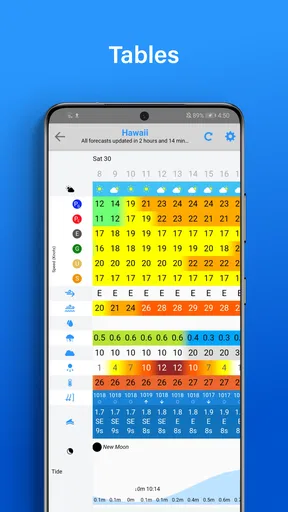
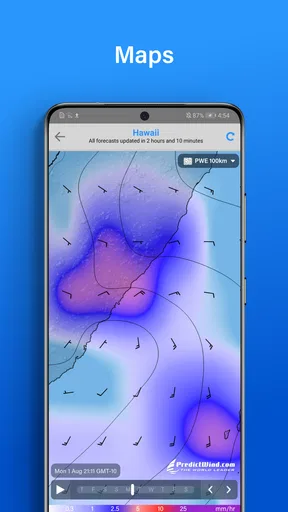
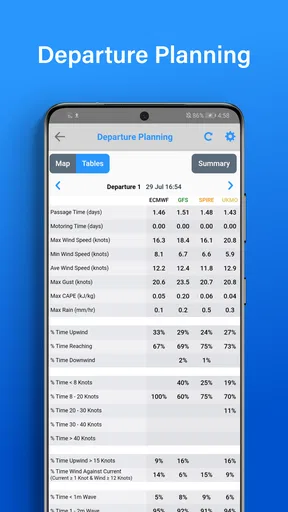
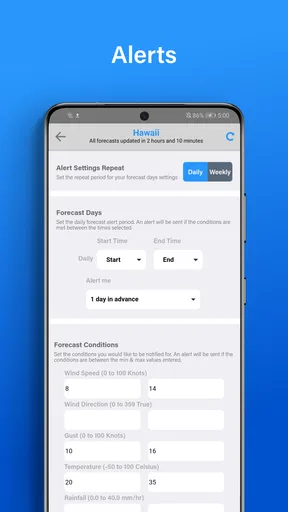
 Analysis by AppCompare
I’m most cautious about marine weather apps when setup seems simple enough to invite overconfidence. Forecasts are only useful if I’ve chosen the right area, understand what the display represents, and have a plan for checking conditions again before departure. That’s the practical lens I bring to PredictWind - Marine Forecasts, a free weather app from PredictWind Limited built around planning for time on the water rather than checking whether it might rain on the way to work.
Where a smooth start can turn into friction
The app is designed to bring several kinds of forecast information into one place, but that breadth can make the first session feel more involved than opening a basic weather app. Someone who only wants a quick local outlook may find marine maps, model choices, and route planning unnecessary at first. I’d begin with one familiar stretch of water and a single question—such as whether conditions look suitable for a planned outing—before exploring every layer.
Another point to keep in mind is that a forecast is not a live observation of the water around your boat. A map can help me understand the forecast picture, but I wouldn’t treat a changing display as proof that conditions have been measured right beside me. Comparing models is useful when they disagree; it is not a guarantee that one option will be correct. For a consequential trip, I would use the app as one part of a broader decision, not as permission to ignore local conditions or sound judgement.
PredictWind has a 4.7 average from around 29,000 ratings, and more than a million installs. Those figures suggest it has found a substantial audience, but they don’t tell me whether its depth fits every boater. The better question is whether I need a marine-focused planning tool or just a quick general forecast.
Setup checks that prevent avoidable confusion
Before relying on a forecast, I’d check that the map is centred on the intended area and that I’m reading the relevant time rather than assuming the first screen represents conditions for my departure. That sounds basic, but a forecast for the wrong coast or an inconvenient time can be more misleading than a plain, less detailed outlook. I’d also take a moment to learn what each overlay is showing before comparing wind, temperature, or swell information.
When I’m evaluating different models, I’d compare the same location and forecast period rather than switching between screens and remembering details from memory. If the outlooks differ, I’d treat that disagreement as a reason to be more careful and revisit the plan—not cherry-pick whichever view supports the trip I already wanted to take. This is one of the app’s more useful habits to build: the comparison is valuable because it reveals uncertainty, not because it removes it.
Offline use also takes a little forethought. I’d download the forecast information I need while I still have a connection, then confirm it is accessible before leaving coverage. A saved forecast can help when mobile service drops, but it should not be confused with fresh information. If the weather changes substantially or plans shift to another area, I would avoid assuming an earlier download still answers the new question.
Worth Reading Before You Choose

Flipboard Shows What News Apps Must Do Beyond the Feed

Switching to Android Auto Means Rethinking Your Driving Routine

Google Calendar Makes a Crowded Week Easier to Manage

Ludo King Makes the Most of the Minutes Between Plans

Baby Panda World Brings Quick Play to Modern Phones, but Its Game Library Feels Busy

ESPN’s Live Game View Makes Following Close Games Easier
Recovering a workflow when plans change
Imagine I’m getting ready for a day sail and the intended departure time moves later. Rather than relying on the forecast I checked in the morning, I’d revisit the relevant period, inspect the map for the route area, and see whether the model comparison still supports the plan. If the route itself changes, I’d review the new area instead of carrying over assumptions from the original destination. That small reset is more useful than repeatedly refreshing one screen without checking what has actually changed.
If a route-planning result looks unexpected, I’d first verify the start and end points and make sure they match the trip I mean to evaluate. Then I’d look at the weather context behind the suggestion and compare it with the alternatives available in the app. An estimated arrival time is helpful for thinking through a plan, but I would treat it as an estimate rather than a promise; actual progress depends on conditions and decisions made along the way.
If the app seems to be showing old information after I have downloaded forecasts, I’d check whether I’m viewing the intended location and period, and whether I have a current connection before expecting a fresh update. If I’m already offline, I’d work from the material saved beforehand and avoid making a new route or changed forecast area seem covered when it may not be. These checks are simple, but they help distinguish a setup mix-up from a genuine change in conditions.
When the app is not the cause
Not every confusing forecast means something has gone wrong with the app. Weather models can produce different outlooks, and conditions on the water may not match a broad forecast exactly. If a display looks surprising, I’d check the selected time and location first, then compare the other model views instead of assuming the app has failed. If the models remain inconsistent, that uncertainty is part of the decision I need to account for.
Likewise, a missing fresh update while out of range is a connectivity constraint, not something an offline forecast can fix. The sensible response is to prepare before departure and avoid treating stored information as current indefinitely. For unfamiliar waters or a trip where changing conditions would carry serious consequences, I’d pair the app with appropriate local knowledge and other reliable ways of assessing the situation.
Who will get the most from it
I see the strongest fit for sailors and other boaters who plan routes, want marine-specific context, and are willing to spend a little time learning how to read forecast comparisons. The route tool and map overlays make more sense when I have a real trip to assess than when I’m casually checking the weather. The app can also help a newer sailor develop a more deliberate routine: check the area, compare the outlooks, consider the timing, and prepare information before losing coverage.
On the other hand, a casual user who only wants a quick temperature and rain check may be happier with a simpler general weather app. PredictWind’s marine focus is a strength for planning on the water, but it can feel like extra work if I never use routes, overlays, or model comparisons. I’d also avoid treating it as a substitute for experience, local advice, or a conservative decision when the forecast is uncertain.
The app is free to download, rated for Everyone, and offers in-app purchases ranging from $6.99 to $499.00 per item. I’d check the current options inside the app before planning around any particular paid capability, and start by deciding whether the basic workflow answers my needs. It has been available since March 17, 2011, and version 5.5.2.1 requires iOS 8.0 or later. That long presence doesn’t make every forecast infallible, but it does make this a well-established marine-weather option rather than a general forecast app with a nautical label.
Setting Sail with PredictWind
The first thing you'll notice when you download PredictWind - Marine Forecasts is how easy it is to get started. The app design is clean and straightforward, which means you won't be fumbling around trying to figure out where everything is. After a quick setup, you’re all set to dive into the ocean of weather data it offers.
Weather Models Galore
One of the standout features of PredictWind is the variety of weather models it provides. Whether you're looking for something basic or want to dive deep into complex data, this app has got you covered. It uses four different weather models, including the ECMWF and GFS, to give you the most accurate forecasts possible. This is a huge plus because having multiple models allows you to compare and determine the most likely weather scenario.
And let me tell you, having access to such a variety of models really helps when you're planning your trip. You can see the forecast up to seven days in advance, giving you plenty of time to make any necessary adjustments to your plans.
Interactive Map Features
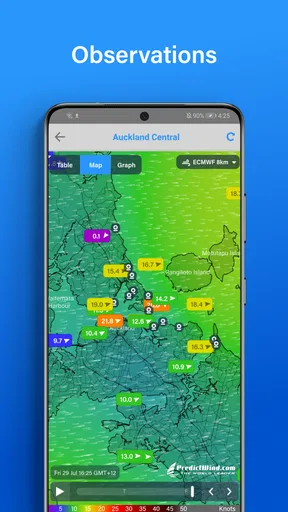
The interactive map is another feature that I found incredibly useful. It's not just a simple map showing you the weather; it’s loaded with detailed overlays that let you see wind speed, direction, temperature, and even swell heights. You can zoom in on a specific area and get a detailed forecast, which is perfect if you're planning on exploring a new sailing route.
Plus, the map updates in real-time, so you’re always looking at the latest data. I found this particularly helpful during a recent trip when the weather suddenly changed. Having that real-time info at my fingertips was a game-changer.
Route Planning Like a Pro
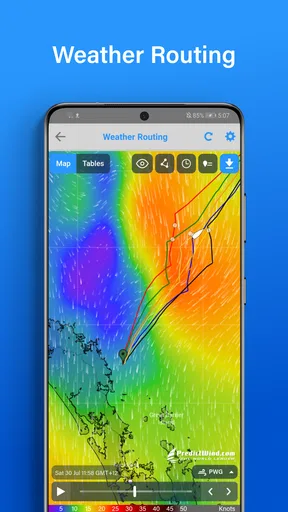
Planning your sailing route has never been easier thanks to the app's route planning feature. You can input your start and end points, and PredictWind will suggest the best route based on the current weather conditions. It even calculates your estimated time of arrival, which is super handy.
And if you’re like me and prefer to have a backup plan, the app offers alternative routes in case the weather turns. This gives you peace of mind knowing you have options if things don’t go as planned.
Offline Capability
One of my favorite things about PredictWind is that you can download forecasts for offline use. Let’s face it, cell service can be spotty when you’re out at sea, so being able to access weather data without an internet connection is a major plus. Just download the data before you head out, and you’re all set.
This feature came in handy during my last trip when I was sailing through a region with no service. I was still able to keep track of the forecast and make informed decisions about my route.
User Experience and Support
The app is incredibly user-friendly. Everything is intuitive, and the interface makes it easy to navigate through the various features. Plus, PredictWind offers fantastic customer support. If you ever run into any issues or have questions, their support team is just a click away, ready to help you out.
They also provide tutorials and guides, which are really helpful, especially if you’re new to using weather apps for marine forecasts.
Overall, I’d say PredictWind - Marine Forecasts is a must-have if you’re serious about sailing. It’s packed with features that are not only useful but also essential for safe and enjoyable trips. Whether you’re a seasoned sailor or just getting started, this app will make your marine adventures a breeze.
So, what are you waiting for? Download PredictWind - Marine Forecasts and set sail with confidence. Happy boating!
Pros
- Highly accurate weather predictions.
- User-friendly interface and navigation.
- Includes detailed marine charts.
- Customizable alerts for conditions.
- Offline access to downloaded maps.
Cons
- Premium features require subscription.
- Limited free access to data.
- Occasional data update lags.
- Not optimal for non-marine use.
- Can be resource-intensive on devices.
FAQs for PredictWind - Marine Forecasts
What features does PredictWind offer for marine forecasts?
PredictWind provides a comprehensive suite of forecasting tools tailored for marine navigation. Users can access high-resolution weather models, wind maps, and sea temperature data. The app also offers route planning, live wind observations, and alerts for weather changes, ensuring that you have all the information needed for safe and efficient maritime activities.
Is PredictWind suitable for both beginners and experienced sailors?
Yes, PredictWind is designed to cater to both novice and seasoned sailors. Beginners will appreciate its user-friendly interface and straightforward data presentation. At the same time, advanced users can delve into detailed weather models and customize their forecasts. The app’s versatility makes it an excellent choice for all levels of maritime enthusiasts.
How accurate are the forecasts provided by PredictWind?
PredictWind is known for its high accuracy in weather forecasting, thanks to its use of multiple global weather models, including ECMWF and GFS. The app continually updates its data to provide the most current and precise weather predictions. Users can rely on its forecasts for planning safe and efficient maritime excursions.
Can I use PredictWind offline?
PredictWind offers offline capabilities, allowing users to download maps and forecasts for areas where internet access may be limited. This feature is particularly useful for sailors who venture into remote regions. Ensure you download the necessary data before setting sail to have uninterrupted access to critical weather information.
Does PredictWind offer a free version, or do I need to subscribe?
PredictWind offers both free and subscription-based plans. The free version provides basic features, while premium subscriptions unlock advanced tools and more detailed forecasts. Users can choose a plan that best suits their needs, whether they require occasional updates or comprehensive, real-time weather data.


